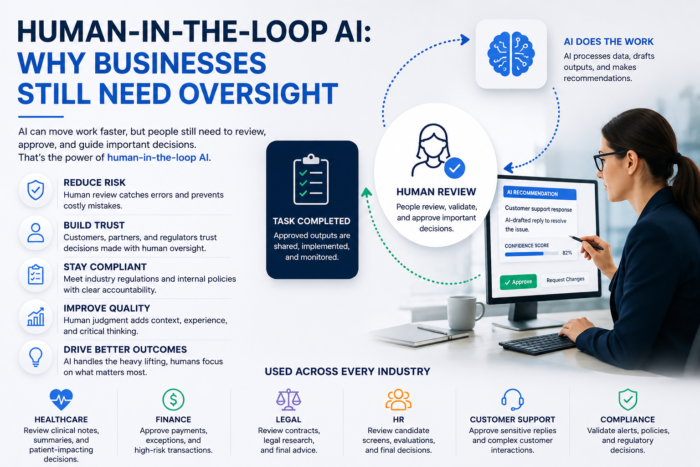
“Keep a human in the loop” is easy to say and easy to get wrong. Put a person in front of every AI output and you rebuild the bottleneck you were trying to remove. Put nobody there and the first confident, wrong answer goes straight to a customer, a payment system or a candidate. The useful question is narrower: which decisions need a person, at what point, seeing what, and how do you prove the review actually happened?
This guide is about that design work. It assumes you already know which process you want to automate. If you are still choosing the process or the firm to build it, start with how to evaluate an AI automation company.
Three oversight modes
Most AI workflows fit one of three modes. Different steps in the same workflow can use different modes.
- Human-in-the-loop (approve before action). The AI proposes; nothing happens until a person approves, edits or rejects it. Slowest, but the only mode where an error can be stopped before it has an effect.
- Human-on-the-loop (monitor and intervene). The AI acts on its own. A person watches metrics, samples outputs and can pause the system or reverse actions. This works when actions are cheap to undo and errors show up quickly.
- Human-out-of-the-loop. The AI acts with no routine human involvement. People still own the system: they set its limits, review its logs periodically and retest it after changes. Suitable only where an error costs little and is easy to fix.
The mode matters more as AI moves from writing text to taking actions. An agentic AI system can update records, send messages and trigger workflows. OWASP’s guidance on excessive agency in LLM applications recommends giving agents only the tools and permissions they need, enforcing authorization in the downstream system rather than letting the model decide, and requiring a human to approve high-impact actions before they are taken.
Risk-tiering: which decisions get which mode
Tier by two questions: how much harm does a wrong output cause, and how easily can it be reversed? The table below is a starting point, not a legal determination; your industry and contracts may push items up a tier.
| Decision type | Harm if wrong | Reversible? | Suggested mode |
|---|---|---|---|
| Drafting internal notes, meeting summaries, ticket tags | Low; internal only | Yes | Out-of-the-loop, with periodic spot checks |
| Routing tickets, prioritizing queues | Low to medium; delays | Yes | On-the-loop: monitor misroutes, sample weekly |
| Customer-facing replies on routine questions | Medium; reputational and, as below, legal | Partly; a sent message cannot be unsent | In-the-loop at launch; move to on-the-loop for narrow categories once error rates are measured |
| Replies about policy, pricing, refunds or contract terms | Medium to high; can bind the company | Hard | In-the-loop |
| Refunds, credits, write-offs | Direct financial loss | Hard once paid | In-the-loop above a set amount; on-the-loop with daily review below it |
| Fraud or anomaly flags | Missed fraud, or wrongly blocked customers | Blocks yes; losses often no | AI flags, person decides on account action (see AI in fraud detection) |
| Hiring screens, candidate ranking, rejections | High; affects livelihood, discrimination exposure | Rarely in practice | In-the-loop for every adverse decision, plus regular adverse-impact testing |
| Credit, insurance or lending decisions | High; regulated | Costly | In-the-loop, with explainable reasons for every denial |
| Anything touching diagnosis or treatment | High; patient safety | Often no | In-the-loop by a qualified clinician; check FDA device rules |
Customer replies sit higher than many teams expect. In Moffatt v. Air Canada, British Columbia’s Civil Resolution Tribunal held the airline responsible for its website chatbot’s incorrect advice on bereavement fares and rejected the argument that the chatbot was a separate entity. If an AI can state policy, assume the company has stated it.
What the rules say in the high tiers
- Credit. Regulation B requires an adverse action notice to give specific principal reasons; 12 CFR 1002.9(b)(2) says that citing internal standards or a failure to reach a qualifying score is insufficient. A model whose reasons nobody can extract does not meet that bar. (The CFPB’s 2022 circular on complex algorithms was among the guidance documents it withdrew in May 2025, but the regulation itself still applies.)
- Hiring. The federal Uniform Guidelines on Employee Selection Procedures treat a selection rate for any group below four-fifths of the highest group’s rate as general evidence of adverse impact. The EEOC removed its AI-specific technical assistance from its website in early 2025, but the underlying Title VII obligations did not change. In New York City, Local Law 144 bars using an automated employment decision tool unless it has had a bias audit within one year of use, the audit information is public, and candidates are notified; enforcement began July 5, 2023.
- Clinical software. The FDA’s clinical decision support software guidance (updated January 2026) sets out which CDS functions fall outside the definition of a medical device.
- Selling into the EU. Article 14 of the EU AI Act requires high-risk systems to let overseers understand the system’s limits, stay aware of automation bias, override or reverse its output, and halt it. For remote biometric identification it requires separate verification by at least two people.
For a general structure, the NIST AI Risk Management Framework (January 2023, voluntary) organizes the work into Govern, Map, Measure and Manage, and NIST added a Generative AI Profile (AI 600-1) in July 2024. None of this replaces advice from counsel in your sector.
How to design the approval step
1. Route by confidence, but calibrate first
A common pattern: outputs above a confidence threshold go to light-touch or sampled review; outputs below it go to a person before anything happens. The catch is that a model’s stated confidence is often poorly calibrated, and a language model’s self-reported certainty is weaker still. Before trusting any threshold, run a few hundred real cases through the system with humans reviewing all of them, then check the error rate in each confidence band. Set the threshold where the error rate in the auto-approved band is one you can live with, and re-check it whenever the model, prompt or data source changes.
Confidence should never be the only gate. Hard rules sit on top of it: refunds above a dollar amount, any message mentioning legal action, any candidate rejection and any account closure go to a person regardless of score.
2. Sample what you do not review
Items that skip pre-approval still need sampling, or you will not notice drift. Sample more heavily at launch, after any model or prompt change, and for new categories of request. Lower the rate only when measured error rates stay flat over a meaningful number of cases. Sample at random, not just the cases someone happened to complain about.
3. Define escalation
Write down who handles what the first reviewer cannot: a supervisor for refunds above their limit, legal for anything that sounds like a claim, a clinician for medical content. Set a response time for each queue. A review step with no escalation path turns into reviewers approving things they are unsure about because there is nowhere else to send them.
4. Design what the reviewer sees
The review screen decides the quality of the review. Give the reviewer:
- The original input (the customer’s message, the application, the invoice), not just the AI’s output.
- The sources or records the AI used, with links, so claims can be checked in one click.
- The reason the item was routed to them: low confidence, a rule trigger, or random sample.
- Edit, reject and escalate as options that are as easy as approve, plus a required reason code on rejection.
- For actions, a preview of exactly what will change in which system.
Building these screens usually means connecting the review queue to your CRM, ticketing or ERP system. That integration work is covered in connecting AI to your business tools.
How to avoid rubber-stamping
Automation bias is the tendency to accept a system’s output because the system produced it. The EU AI Act names it directly in Article 14. It is the main way a review step fails, and it gets worse as the AI gets better: when a reviewer approves 200 correct drafts in a row, the 201st gets less attention.
Controls that help:
- Keep queues small. Route only what needs judgment. A reviewer facing hundreds of items a day will skim.
- Measure review behavior. Track time per review, edit rate and rejection rate per reviewer. Near-zero edits combined with very short review times is a warning sign.
- Seed known errors. Periodically insert test items with planted mistakes and check whether they are caught. Treat the catch rate as a metric for the review step itself.
- Ask for a judgment, not a click. For high-stakes items, have the reviewer confirm a specific fact (the amount, the policy clause, the candidate’s qualifying criterion) rather than pressing one approve button.
- Rotate and train. Reviewers should know the system’s typical failure modes. Share real caught errors in training.
- Protect the right to say no. If rejection rates count against a reviewer’s throughput target, you are paying people to approve.
What to log for audit
If you cannot reconstruct a decision six months later, you cannot defend it or improve the system. For every AI-assisted decision, log:
- The input, the AI output, and a timestamp.
- The model, version and prompt or configuration version that produced it.
- The confidence score and the routing reason (threshold, rule, sample, or auto-approved).
- The reviewer’s identity, the action taken (approve, edit, reject, escalate), the final output if edited, and the time spent.
- The reason code for any rejection or override.
- The downstream action executed, under which system identity, and any later reversal.
Review these logs on a schedule. Rejection reasons tell you what to fix in the model or prompt; the share of items needing edits tells you whether a category is ready to move down a tier. Set retention in line with your sector’s record-keeping rules, and restrict access, since the logs will contain the same personal data the workflow handles.
Who owns the oversight design
Oversight is a governance decision, not only an engineering one. Someone senior needs to sign off on the tier for each decision type, the threshold, and the budget for reviewer time, because that time is a real ongoing cost of the system. The executive side of that, including budget guardrails, is covered in AI for CEOs: starting points that protect your budget.
When you talk to providers, ask them to show you a review screen and an audit log from a past project, explain how they would set your first threshold, and say what they would not automate. Firms that build these workflows are listed in the AI/ML providers directory.
Frequently Asked Questions
In a human-in-the-loop setup, the AI proposes and a person must approve before anything happens, so nothing reaches a customer or system without sign-off. In a human-on-the-loop setup, the AI acts on its own while a person watches dashboards, samples results and can pause or reverse actions. The first trades speed for control; the second keeps speed but relies on fast detection and easy rollback.
No. Reviewing everything usually backfires: queues grow, reviewers get tired and start approving without reading. Reserve pre-approval for decisions that are hard to reverse or that affect someone’s money, job, health or legal rights. Low-stakes internal work can run with spot checks, and the sampling rate can drop as the measured error rate stays low.
Measure it. Track how long each review takes, how often reviewers edit or reject, and whether agreement with the AI is suspiciously close to 100 percent. Seed the queue with a few known-bad items and check whether they are caught. If approvals take seconds and nobody ever changes anything, the review step is decorative, not a control.
There is no single federal rule requiring it across the board. Obligations come from existing law in specific areas, such as fair-lending notice rules, employment discrimination law and local rules like New York City’s Local Law 144 for hiring tools. Companies selling high-risk systems into the EU face explicit oversight requirements under the EU AI Act. Check your sector with counsel.


 Free Consultation call: your goals, timeline, and ballpark budget