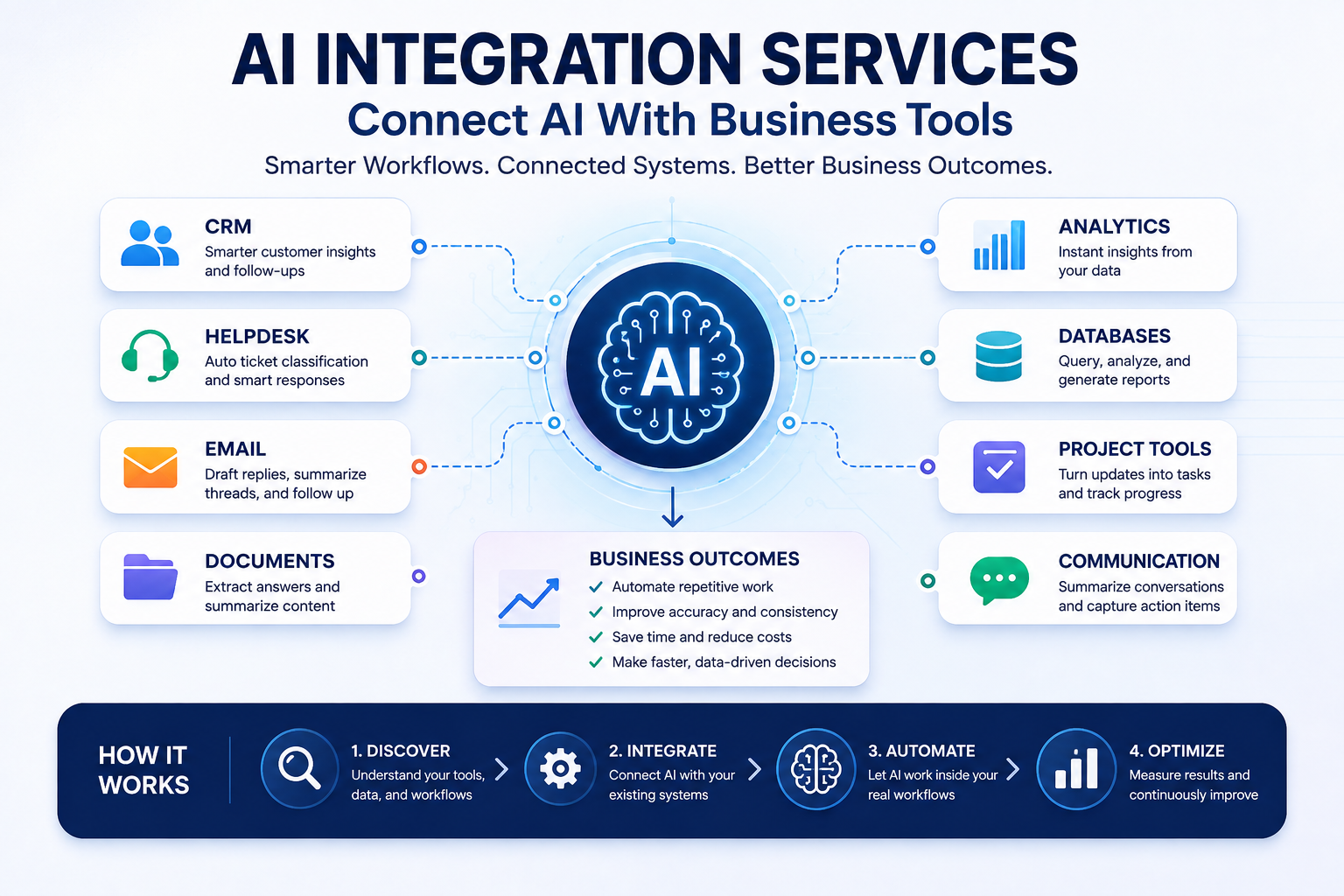
Most companies already pay for a CRM, a helpdesk, an ERP or accounting system, and a shared drive full of documents. Many also pay for an AI assistant. The two rarely meet: someone summarizes a call in a chat window, then pastes the summary into the CRM by hand. AI integration is the work of closing that gap, so the model reads the right records and its output lands where the work happens.
This post covers the five common integration patterns, how to control what the AI can see and change, what to log, and what drives effort. If you are still deciding which business process to automate in the first place, start with our guide to choosing an AI automation approach and firm.
What “integration” means in practice
Every AI integration does some combination of three things:
- Read: pull context from a system of record, such as a customer’s history from the CRM, an open ticket from the helpdesk, or a policy from the document store.
- Reason: send that context plus an instruction to a model and get back a summary, classification, draft or decision.
- Write: put the result somewhere useful, such as a CRM note, a ticket tag, a draft reply, or a task in a project tool.
The model call is usually the smallest part. Most effort goes into authentication, field mapping, malformed records, and deciding which actions the AI may take unchecked.
The five integration patterns
Integrations fall into five broad patterns. A mature setup often combines two or three.
| Pattern | What it is | When it fits | Effort | Main risk |
|---|---|---|---|---|
| Native AI features inside the tool | The vendor’s built-in assistant, summarizer or classifier, switched on in your CRM, helpdesk or suite | The task lives entirely inside one product and the vendor’s feature does what you need | Low: configuration, permissions, training staff | Limited control over prompts, models and data handling; ties you more tightly to that vendor; licensing cost per seat |
| No-code / iPaaS connectors | Workflow platforms that chain triggers and actions across apps, with an AI step in the middle | Simple, linear flows between popular SaaS tools with well-supported connectors | Low to medium | Flows become brittle and hard to audit as they grow; shared connector credentials often carry broad access |
| Direct API integration with an LLM | Your code calls the system’s API, builds a prompt, calls a model API, validates the output and writes it back | You need control over prompts, validation, error handling and data flow, or connectors don’t exist | Medium | You own maintenance: API changes, rate limits, model updates and edge cases are your problem |
| Retrieval over company documents (RAG) | Documents are indexed; at question time the most relevant passages are retrieved and passed to the model | Answering questions from policies, manuals, contracts, past tickets or knowledge bases | Medium to high, mostly in document cleanup and permissions | Leaking documents to users who shouldn’t see them; confident answers from stale or wrong documents |
| Custom middleware / orchestration layer | A service that sits between the AI and several systems, exposing a fixed set of tools and enforcing rules | Multi-system workflows, write access to systems of record, compliance or audit requirements | High | Scope creep and cost; it becomes a product you have to run and support |
Native features
If the task starts and ends inside one tool, check what the vendor already offers before commissioning anything. Many CRMs and helpdesks now include summarization, drafting and classification. Compare options in the AI CRM tools category or the customer support tools list. The questions to ask the vendor are about data: which model processes your records, where, whether your data is used for training, and what the feature can change on its own.
No-code and iPaaS connectors
These are the fastest way to prove a flow works, such as “classify a form submission, create a CRM lead, notify the rep.” They get harder to manage once a flow branches, needs retries, or touches sensitive data. A connector authorized by an admin often carries admin-level access.
Direct API integration
Here a developer writes code that reads from the system’s API, calls a model, checks the response against an expected format, and writes back. You can pin the model version, test prompts, and reject malformed output. Our guide to building AI-powered web applications covers the application side of this pattern in more depth.
Connection standards are reducing the amount of one-off connector code. The Model Context Protocol (MCP) is an open-source standard for connecting AI applications to external systems such as files, databases and tools, and AI assistants including Claude and ChatGPT support it. MCP standardizes the connection, but it does not remove the need for sensible permissions on whatever the server exposes.
Retrieval over company documents (RAG)
Retrieval-augmented generation pairs a language model with a searchable index, so answers are grounded in passages retrieved at question time rather than in what the model memorized. For a business, that means the model can answer from your HR policy or product manuals without retraining. To update an answer, you update the document and re-index it.
The hard parts are usually not the vector database. They are duplicate and outdated documents, scanned PDFs, and making the retrieval step respect the same access rules as the source system. If a document is restricted to finance in SharePoint, the retrieval layer has to filter it out for everyone else before the model ever sees it.
Custom middleware
When an AI needs to work across the CRM, the ERP and email, and especially when it can change records, a middleware layer is usually the safer design. Instead of handing the model raw API access, you expose a short list of narrow functions, such as “look up order status” or “add a note to this account.” The middleware enforces who can call what. This is a real software build. Our custom AI development playbook covers phases and cost drivers for that kind of project.
Data access and permissions
The most common integration mistake is giving the AI the same access as the person who set it up. OWASP lists excessive agency as a top risk for LLM applications. Its root causes are too much functionality, too many permissions and too much autonomy. The mitigations translate directly into integration design:
- A dedicated identity per integration. Use a service account or app registration, not a staff member’s login, so access can be scoped, audited and revoked independently.
- Narrow scopes. OAuth lets a client request a specific access scope. Request the smallest one that works, and prefer read-only until a write action is justified.
- Act in the user’s context where possible. If a sales rep asks a question, the integration should only see what that rep can see in the CRM, not everything the service account can reach.
- Enforce authorization outside the model. Don’t rely on a prompt that says “only show the user their own accounts.” Check every request in code or in the downstream system.
- Narrow tools, not general ones. “Update the stage field on one opportunity” is safer than “run any API call.”
For personal data, OWASP’s guidance on sensitive information disclosure recommends limiting access on a least-privilege basis, limiting the model’s access to external data sources, and sanitizing data before it reaches the model. In practice, that means sending only the fields a task needs. A ticket classifier rarely needs the customer’s phone number or payment details. It also means confirming the model provider’s data-retention and training terms, and masking identifiers where the output doesn’t depend on them.
Documents and records the AI reads are also an attack surface. OWASP describes indirect prompt injection, where instructions hidden in a web page, email or file change the model’s behavior. An integration that reads inbound emails and can also send emails needs a human approval step or strict output validation. For how to design those approval points, see our post on human-in-the-loop AI.
What to log
Logging and monitoring are among OWASP’s damage-limiting measures for AI systems that take actions. They also matter when someone asks why the AI wrote a particular note on a customer record. For each AI action, a useful log captures:
- A timestamp, the integration’s identity, and the end user it acted for
- The source records read (IDs, not full copies of personal data)
- The model and version, and the prompt template version
- The output, whether it passed validation, and what was written where
- Whether a human approved, edited or rejected it
- Errors, retries, rate-limit hits, token usage and cost
Decide up front how long logs are kept and who can read them. Prompt and response logs can contain the same sensitive data you were careful to minimize elsewhere. For governance, the voluntary NIST AI Risk Management Framework and its Generative AI Profile are common reference points.
How to estimate effort
Integration effort is driven far more by the systems and the data than by the model. These are the factors that move an estimate:
| Factor | Lower effort | Higher effort |
|---|---|---|
| Number of systems | One source, one destination | Three or more systems, with data joined across them |
| API availability | Documented REST API, sandbox environment, generous rate limits | No API, file exports only, on-premise ERP, or undocumented endpoints |
| Authentication | Standard OAuth with granular scopes | Shared admin keys, VPN access, SSO constraints, per-user delegation |
| Data quality | Consistent fields, few duplicates, current documents | Free-text fields, duplicate records, outdated or conflicting documents |
| Read vs write | Read-only: summaries, answers, suggestions | Writes to systems of record, especially financial or customer-facing |
| Permissions model | Everyone sees the same data | Row- or document-level access that must carry through to the AI |
| Compliance and audit | Internal, low-sensitivity data | Regulated data, audit trails, data-residency requirements |
Data quality deserves extra weight. Gartner predicts that through 2026, organizations will abandon 60% of AI projects unsupported by AI-ready data. A short data audit before scoping is cheaper than discovering duplicate CRM records halfway through a build.
When you ask providers for quotes, give each one the same written scope: the systems and their API docs, sample records, read or write access, approval rights, and logging requirements.
Where to go next
If the work spans several systems, involves write access, or needs a retrieval layer with real permissions, it is an engineering project. Compare firms that do that work in the AI/ML development provider category.
Frequently Asked Questions
An AI tool is a product you use on its own, usually in a separate tab or app. An integration wires a model into the systems where your records already live, so it can read the right data and write results back to the CRM, ticket or document. The integration work is mostly authentication, data mapping, permissions and error handling, not the model itself.
No. Retrieval-augmented generation leaves the model unchanged. At question time it searches an index of your documents and passes the most relevant passages to the model alongside the question. That makes updates cheap, because you re-index documents instead of retraining, and it lets you apply document-level permissions at search time. Answer quality depends heavily on how clean and current the indexed documents are.
It can, but start read-only and add write access one action at a time. Give the integration its own scoped credentials, restrict it to specific objects and fields, validate every proposed change in code, and route high-impact writes such as deletions, bulk updates or financial records through a person for approval until the error rate is known.
Not necessarily. The Model Context Protocol is an open standard that lets AI applications connect to data sources and tools in a consistent way, and support for it is growing. But a direct API integration or an iPaaS connector still works fine. MCP is most useful when several AI clients need the same tools, or when you want to avoid writing one-off connectors for each assistant.


 Free Consultation call: your goals, timeline, and ballpark budget